Block the newsfeed
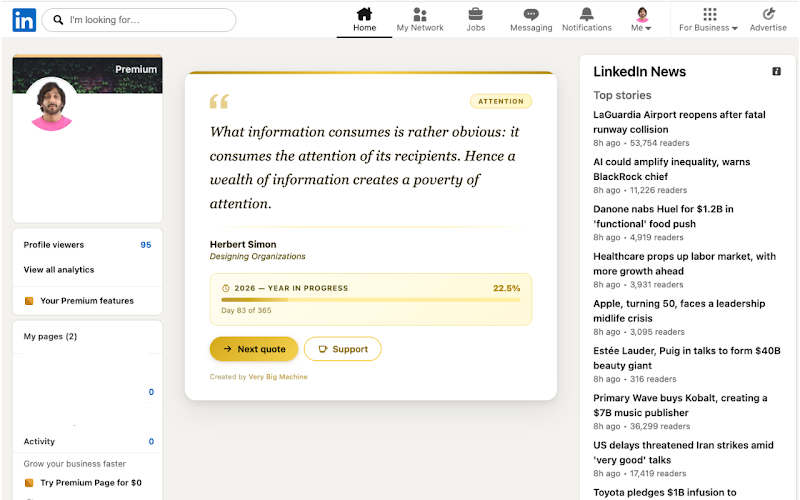
The LinkedIn scroll feed disappears. You land on LinkedIn and the distraction trap is gone. Messages, jobs, your profile, and search still work exactly as normal.
Block the LinkedIn newsfeed and stop the scroll. Free Chrome extension. Setup in 1 minute. Zero data collected, zero complexity.
What it does
LinkedIn is useful for job search, messages, and professional networking. The newsfeed is not. It's a passive scroll trap designed to maximize time-on-site — not your productivity.
Simple LinkedIn Newsfeed Blocker removes the feed entirely. You can still use LinkedIn for everything you actually need — messages, jobs, your profile, connections, search — but the newsfeed is gone. No comparison. No anxiety. No wasted time.
Features
Two modes. No accounts. No complexity.
The LinkedIn scroll feed disappears. You land on LinkedIn and the distraction trap is gone. Messages, jobs, your profile, and search still work exactly as normal.
Go further: enable homepage blocking and you'll be redirected away from linkedin.com entirely. Only visit LinkedIn when you have a specific, intentional reason to.
Nothing is tracked. Nothing is stored. Nothing is sent anywhere. The extension runs entirely in your browser. We do not collect, retain, or mine any data — ever.
How it works
Click "Add to Chrome" on the Chrome Web Store listing. No account required. No sign-up. The extension installs and activates instantly.
Go to linkedin.com. The newsfeed section is hidden. You'll see a clean page with navigation intact. Messages, jobs, and your profile work normally.
Click the extension icon in Chrome and toggle "Block homepage" to redirect away from the LinkedIn home screen entirely. Useful for breaking the habit of opening LinkedIn reflexively.
Why it matters
The LinkedIn feed is built on social comparison — promotions, new roles, public wins. Removing it eliminates the anxiety loop and lets you focus on your own work.
Passive LinkedIn scrolling adds up fast. Block the feed and LinkedIn becomes a tool you use with intention — a specific message, a specific job — then you're done.
Many users describe blocking the LinkedIn feed as one of the most effective digital wellness changes they've made. Less noise. Calmer mornings. More time doing the work that matters.
FAQ
No. Simple LinkedIn Newsfeed Blocker only hides the newsfeed section. Messages, notifications, job search, your profile, connections, and all other LinkedIn features continue to work normally.
No. We collect zero data. No browsing history, no analytics, no personal information. The extension runs entirely locally in your browser. Nothing is ever transmitted to our servers or anyone else's.
Yes. Simple LinkedIn Newsfeed Blocker is completely free. There is no paid tier, no subscription, and no in-app purchases. It does one thing and does it for free.
Blocking the feed hides the newsfeed scroll section when you're on LinkedIn — you can still navigate there, the feed is just invisible. Blocking the homepage (optional setting) redirects you away from linkedin.com entirely when you land on the home screen — useful for breaking the reflex of opening LinkedIn as a habit.
Yes. Click the extension icon in Chrome to toggle blocking on or off at any time. You can also disable the extension entirely from Chrome's extensions page.
Free Chrome extension. Zero data collected. Setup in under 1 minute.
Install free — Chrome Web StoreRead: LinkedIn status anxiety and how blocking the feed helps · Very Big Machine